How to Save a ChatGPT Conversation as PDF
To save a ChatGPT conversation as PDF, open the chat, select the whole conversation, copy it and paste it into the box below. Then pick PDF and download the file. The tool spots the "You said:" and "ChatGPT said:" markers, so every turn stays apart and your code and tables stay readable.
By The Chatsheaf team (Product and testing). Last updated .
How to save a ChatGPT conversation as PDF, step by step
- Open the chat on chatgpt.com and scroll up once, so the whole conversation has loaded.
- Select the conversation from the first message to the last one, then copy it.
- Paste the text into the Paste box on this page.
- Choose PDF under Save as and start the export.
- Download the file and open it in any PDF reader to check it.
The first 3 runs each day are free. After that, see the pricing page for packs and plans, or read how we test the tool.
Save ChatGPT conversation as PDF tested with a real input
First, we ran our own sample export through this exact tool. The sample follows the real export layout, with chats we wrote ourselves. So the numbers below come straight from that run.
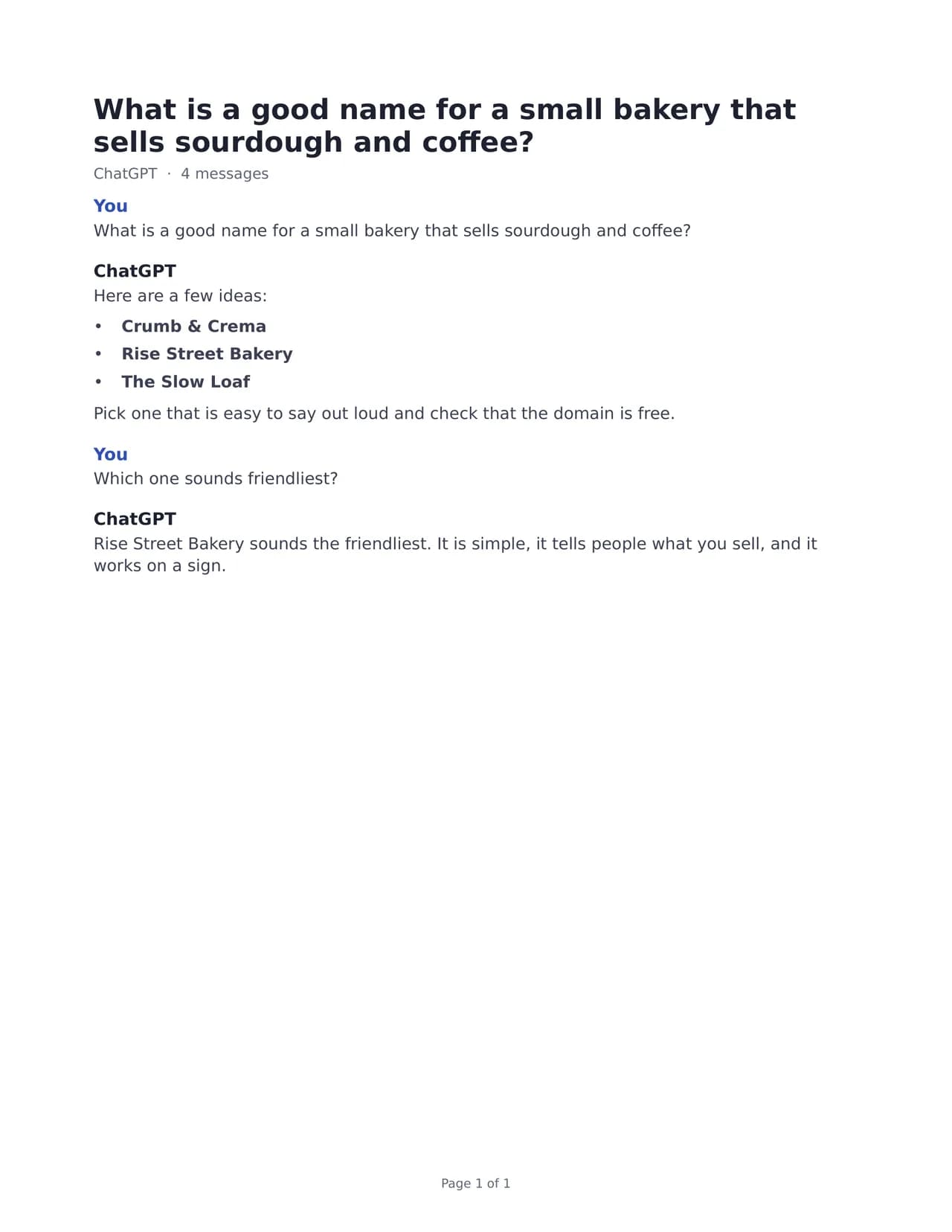
- Test input
- pasted-chatgpt-chat.txt
- Output
- what-is-a-good-name-for-a-small-bakery-that-sells-sourdough.pdf (PDF)
- Conversations
- 1
- Messages
- 4
- Output size
- 20 KB
- Processing time
- 0.1 s
How we test: the sample files hold ChatGPT and Claude chats with tables, code and lists, and we open every output by hand. More on the about page.
Why pasting beats the browser's Print to PDF
Most people first try the Print command in the browser and pick Save as PDF. It works, but the result often looks rough. The print view copies the screen, so the sidebar, buttons and message box can end up on the page too. Long chats also break pages in odd spots, sometimes right through a line.
Code and tables suffer the most. A code block keeps its long lines, and print does not wrap them, so the right side of each line falls off the page. Wide tables get clipped the same way. As a result, the PDF looks fine at a glance but hides the part you needed. Our exporter builds a real document from the text instead, so code blocks and tables stay whole on paper.
Save a ChatGPT conversation as PDF from pasted text
When you copy a ChatGPT page, the text carries small markers such as "You said:" before your turns and "ChatGPT said:" before each reply. The tool reads those markers, so your questions and the answers stay apart in the PDF. It also knows the labels "User:", "Assistant:" and "Claude:", which means a copied Claude chat works the same way.
You do not need the full ChatGPT data export for this route. That export can take up to 7 days to arrive, while pasting takes a minute. So the paste box is the quick path for one chat you want to keep, print or send to someone today.
Pictures do not travel with copied text, so the PDF holds the words only. If a chat leans on images, keep the original page open next to the file.
What ends up in the PDF
The file lists each turn in the order the chat showed it, so you can follow who said what. Headings, lists, tables and code blocks keep their structure. Every page gets a page number, which helps when you print the chat or point a coworker to one answer.
The PDF font covers Latin, Greek and Cyrillic letters. However, emoji and Chinese, Japanese or Korean characters are left out of the PDF, and a short note page tells you so. If your chat needs those, pick Word, HTML or Markdown instead, because those formats keep every character.
When this exporter is not the right choice
Be honest with yourself about what you need. If the images in a chat matter most, the browser's print view may serve you better, because our files show an image as "[Image]" only. Also, a ChatGPT share link does not work here. Open the shared chat, copy the text and paste it instead.
Finally, pasting suits one chat at a time. For a whole year of chats, request the ChatGPT export and upload the zip, so one PDF holds them all. Gemini, Grok, Copilot and DeepSeek chats are not supported at all.
Free, private and with no account
You can make a few free exports each day without signing up. A free PDF carries a one-line footer, and one credit removes it, so check the pricing page if you need clean files often.
Your text goes to our server only to build the file. The server reads it in memory, creates the PDF and then forgets it. We keep a log row with the format, the count and the time, and nothing else.
Pasting the chat vs printing the page
| What you care about | Paste into this exporter vs browser Print |
|---|---|
| Long code lines | Kept inside the code block vs often cut at the page edge |
| Wide tables | Kept as a table vs often clipped on the right |
| Sidebar and buttons | Never printed vs often printed with the chat |
| Turn labels | Clear label per turn vs whatever the screen showed |
| Images | Shown as [Image] vs printed as shown on screen |
| Page numbers | On every page vs depends on the browser |
Save ChatGPT conversation as PDF FAQ
How do I save a ChatGPT conversation as PDF for free?
Copy the whole chat, paste it into the box on this page, pick PDF and download. A few exports each day are free, with no account. A free file carries a short footer line.
Why does Print to PDF cut off my ChatGPT code?
The print view keeps long code lines as they are and does not wrap them, so the end of each line runs past the page edge. Wide tables get clipped for the same reason. Pasting the text here gives you a document with the code kept inside its block.
Does the PDF keep the images from my chat?
No. Copied text holds no pictures, so the PDF shows the words only. An image from an export zip shows up as "[Image]" in the file.
Can I paste a ChatGPT share link instead of the text?
Not yet. Open the shared chat in your browser, select the whole conversation, copy it and paste the text into the box.
Why are emoji missing from my ChatGPT PDF?
The PDF font covers Latin, Greek and Cyrillic, so emoji and Chinese, Japanese or Korean text drop out, and a note page says so. Word, HTML and Markdown keep every character.
Do you keep a copy when I save a ChatGPT conversation as PDF?
No. The server reads the text in memory, builds the PDF and forgets it. Only a log row with format, count and time stays.