ChatGPT conversations JSON viewer for your export
To read your ChatGPT export, open the zip in this ChatGPT conversations JSON viewer instead of a text editor. It lists every chat with its title, date and message count, so you can search titles, tick the chats you want and save them as one HTML page, Markdown, PDF or Word.
By The Chatsheaf team (Product and testing). Last updated .
ZIP, JSON, TXT or MD. The zip is opened on your device; photos in it are never uploaded.
How to use this ChatGPT conversations JSON viewer, step by step
- Request your data in ChatGPT under Settings, Data controls, Export data, then download the zip from the email.
- Drop the whole zip (or only the conversations file) into the box above. Nothing uploads at this point.
- Browse the list of chats, sorted with title, date and number of messages, and search the titles.
- Tick the conversations you want to read and pick HTML page as the format.
- Open the HTML file in any browser and use its table of contents to jump between chats.
The first 3 runs each day are free. After that, see the pricing page for packs and plans, or read how we test the tool.
ChatGPT conversations JSON viewer tested with a real input
First, we ran our own sample export through this exact tool. The sample follows the real export layout, with chats we wrote ourselves. So the numbers below come straight from that run.
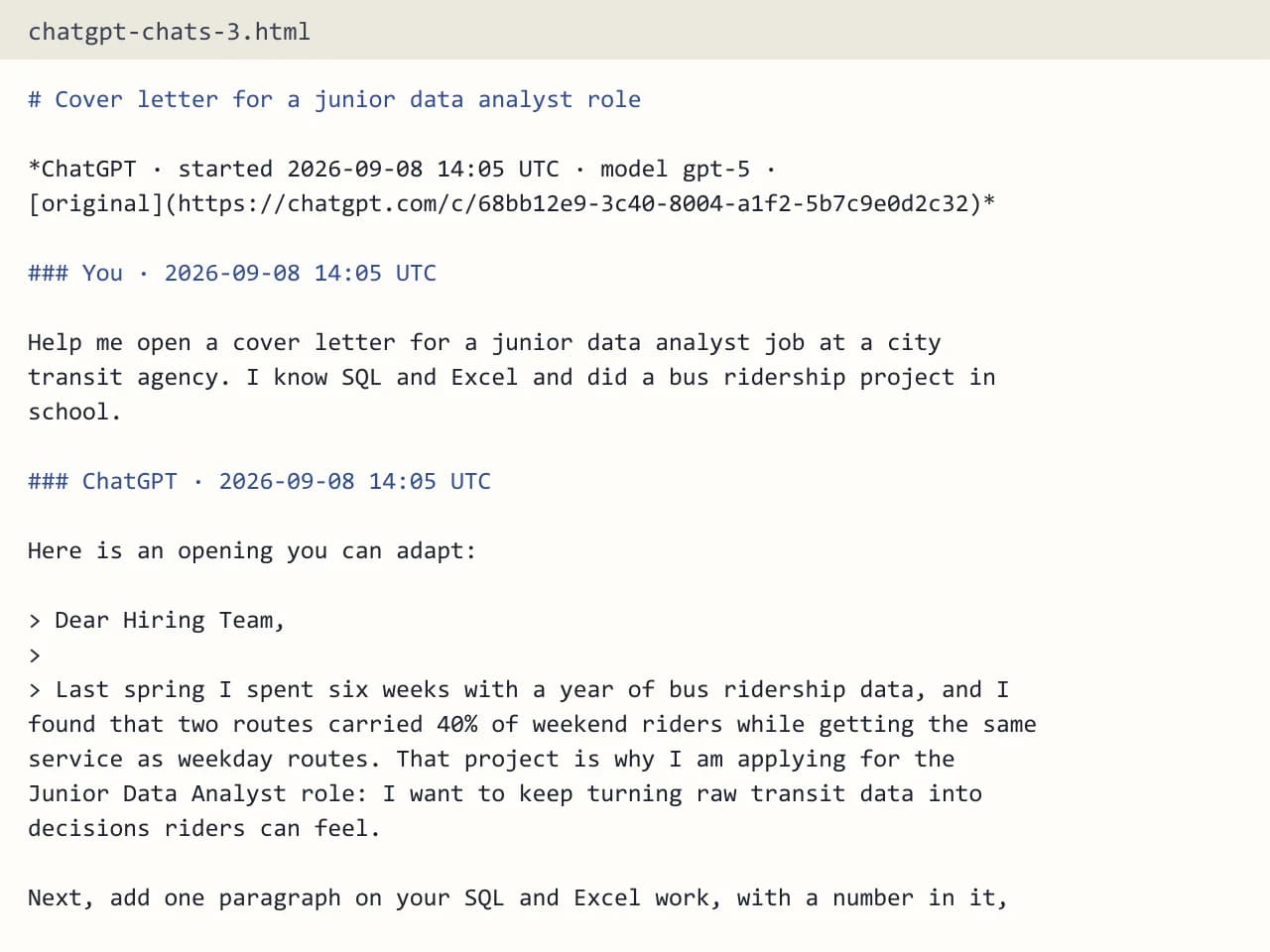
- Test input
- chatgpt-conversations.json
- Output
- chatgpt-chats-3.html (HTML page)
- Conversations
- 3
- Messages
- 8
- Output size
- 7 KB
- Processing time
- 0.0 s
How we test: the sample files hold ChatGPT and Claude chats with tables, code and lists, and we open every output by hand. More on the about page.
Why the raw file is so hard to read
Most people open the export, find conversations.json and expect a transcript. Instead they get one huge line of brackets and IDs. The file stores each chat as a tree of message nodes, because ChatGPT keeps every edit and every regenerated answer as its own branch. So a plain text editor shows you the data, but not the conversation.
Size makes it worse. A few years of chats can turn into a file that freezes a normal editor. Browser JSON viewers also struggle, since they try to draw every nested node at once. In addition, ChatGPT may split a long history into several parts, such as conversations-000.json and conversations-001.json, so one file never holds the whole story.
What this ChatGPT conversations JSON viewer shows you
The viewer walks the message tree for you and follows the visible branch, which is the one your chat window showed. Edited or abandoned branches stay out. As a result, each chat reads top to bottom, user message, then reply, with a UTC timestamp on every turn.
Before you export anything, you see a clean list: title, date and message count for every chat. Because the list is searchable, you can find that one recipe or code fix from last spring in seconds. The title, the model name (when the export has it) and a link back to the original chat also come along into the output.
Code blocks, tables, lists and headings keep their shape. Citation markers like 【4†source】 disappear, so quoted web answers read like normal text.
Your browser opens the zip, not our server
The zip never leaves your computer as a whole. Your browser opens it, reads only the conversations files and skips photos, audio and every other file inside. Only the chats you tick go to the server, as a small JSON file. The server then builds the output in memory, sends it back and forgets it. We keep a log row with the format, the count and the time, and nothing else.
Pick the right output for reading
For reading, the HTML page works best. It is one self-contained file with a table of contents, it works offline and it follows light or dark mode. Markdown suits notes apps, while PDF and Word suit printing or sharing. Plain text is there when you only need the words.
A free run holds the 10 newest of the chats you select, and you get a few free exports each day without an account. For a full history in one file, see the pricing page.
When this viewer is not the right choice
If you only need one short chat, the chat.html file in the same zip may be enough, since it already shows every conversation as one long page. Still, it has no search and no way to pick chats. Our viewer also skips images (it marks them as [Image]), tool calls and model reasoning. So if you need the pictures you made, keep the original zip.
What the viewer reads from conversations.json
| Part of the export | What happens to it |
|---|---|
| Chat titles and dates | Shown in the list, searchable |
| Visible branch of each chat | Kept in order with UTC timestamps |
| Edited or regenerated branches | Left out |
| Split files (conversations-000.json and up) | All read together |
| Images, audio, uploads | Skipped, never uploaded |
| Chats per export | Up to 5,000 |
ChatGPT conversations JSON viewer FAQ
Do I need a ChatGPT conversations JSON viewer to open the file?
You can open it in a text editor, but you will see raw nested data. Instead, drop the zip into a ChatGPT conversations JSON viewer like this one. It turns each chat into readable turns and lets you save them as an HTML page.
Why is my ChatGPT conversations.json so big?
It holds every chat you kept, plus every edited and regenerated branch of each one. That is why it can freeze an editor. Our viewer reads it in the browser and only follows the branch you actually saw.
Is there a ChatGPT conversations JSON viewer that works offline?
The list of chats appears without any upload, because your browser reads the file. Building the output needs one short trip to the server. After that, the HTML page you download works fully offline.
Can I search inside my ChatGPT export?
Yes. The list lets you search chat titles before you export. Once you save the HTML page, you can also use your browser's find feature to search the full text of every message.
Does it show images from my chats?
No. Images appear as [Image] in the text, so you know where they were. The image files stay in your original zip, which you should keep.
What if my export has several conversations files?
ChatGPT sometimes splits a big history into numbered parts. The viewer reads all of them together, so your list shows every chat in one place.