ChatGPT to PDF for One Chat or a Few
To turn ChatGPT to PDF for one chat or a few, drop your ChatGPT export zip below, search the titles and tick the chats you want. Then pick PDF. You get one file where each chat starts on a new page, with a bookmark for every chat and numbers on every page.
By The Chatsheaf team (Product and testing). Last updated .
ZIP, JSON, TXT or MD. The zip is opened on your device; photos in it are never uploaded.
How to convert ChatGPT to PDF, step by step
- In ChatGPT, open your profile menu, then Settings, Data controls and Export data, select Export and confirm.
- Download the zip from the email link within 24 hours, while you are signed in to the same account.
- Drop the zip on this page. It opens in your browser and lists every conversation.
- Search the titles and tick the one chat, or the few chats, you need.
- Pick PDF, start the export and download the file.
The first 3 runs each day are free. After that, see the pricing page for packs and plans, or read how we test the tool.
ChatGPT to PDF tested with a real input
First, we ran our own sample export through this exact tool. The sample follows the real export layout, with chats we wrote ourselves. So the numbers below come straight from that run.
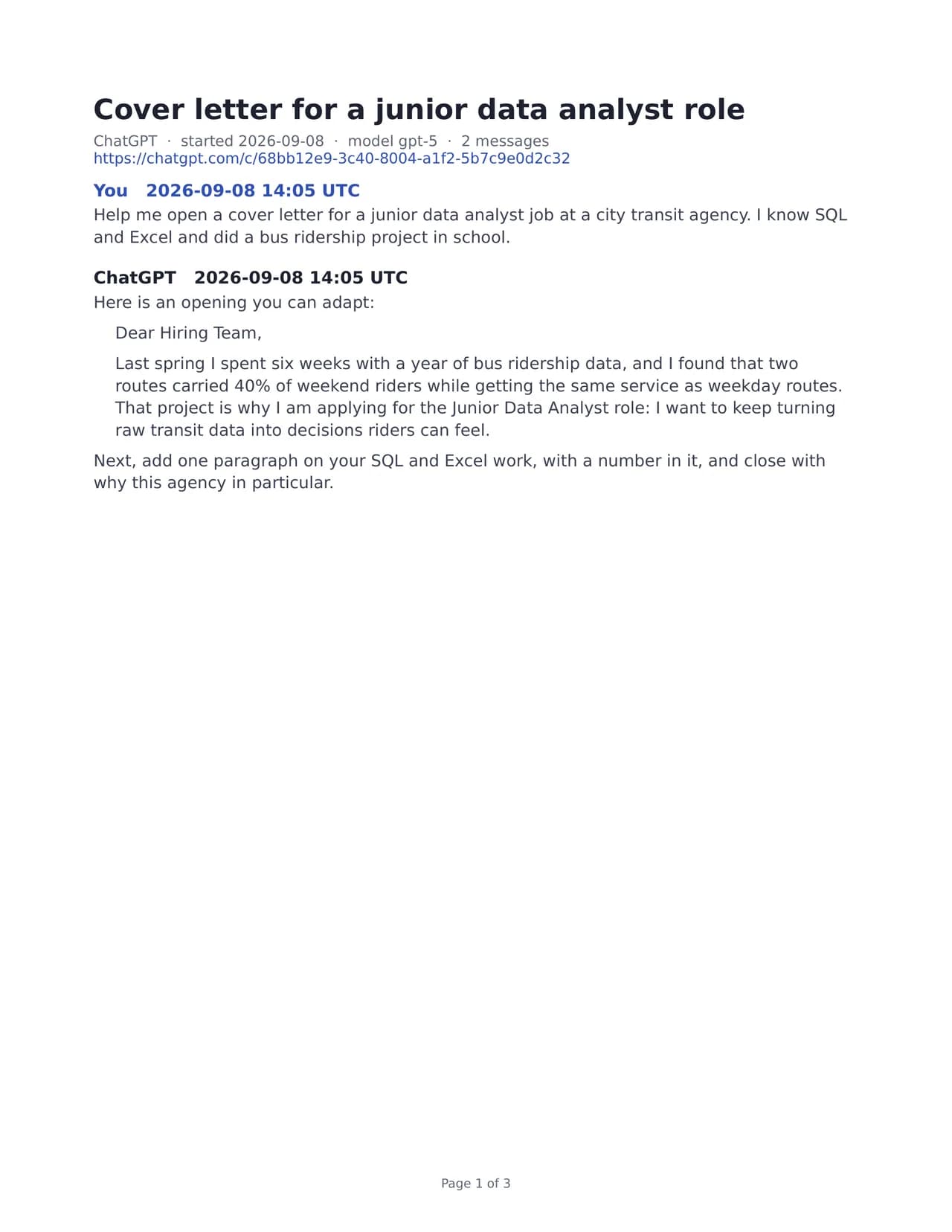
- Test input
- chatgpt-conversations.json
- Output
- chatgpt-chats-3.pdf (PDF)
- Conversations
- 3
- Messages
- 8
- Output size
- 38 KB
- Processing time
- 0.1 s
How we test: the sample files hold ChatGPT and Claude chats with tables, code and lists, and we open every output by hand. More on the about page.
Pick a handful of chats, not your whole history
Your export holds every chat you ever had, which is often far more than you want on paper. So the tool shows the full list first, with the title, the date and the number of messages for each one. Type a word from the title into the search field, then tick the chats that matter.
Only the ticked chats leave your computer, as a small JSON file. The zip itself opens in the browser, and photos, audio and other files inside it are skipped and never uploaded. That is also why a large zip is fine: the 25 MB limit applies to the chats you pick, not to the whole download.
How the ChatGPT to PDF file is laid out
Each chat starts on a fresh page, and the PDF reader shows a bookmark for it in the side panel. So with five chats in one file, you can jump to the third one in a single click. Page numbers run through the whole document.
Inside a chat, every message keeps its time stamp in UTC. The file also carries the title, the model name when the export has it and a link back to the original chat. In addition, code blocks, tables, lists and headings keep their structure.
For ChatGPT, the file follows the branch you see in the chat window. Edited prompts and abandoned branches stay out, and citation markers like 【4†source】 are removed, so the text reads cleanly.
Good reasons to make a short PDF
A short file works well when someone else needs to read the chat. For example, you can send a debugging session to a teammate, attach a research chat to a report or print a trip plan for the road. A teacher can also collect a student's study chat for review.
Because each chat gets its own bookmark, a PDF of three or four chats still feels tidy. Meanwhile, the reader on any phone or laptop opens it without extra apps.
When a PDF is the wrong format
A PDF is for reading and printing, not for editing. If you plan to rewrite the answers, pick Word instead. If the chats should live in a notes app, Markdown or an Obsidian vault fits better.
Also keep two limits in mind. Images show up as "[Image]", and emoji or Chinese, Japanese and Korean text drop out of the PDF (a note page says so). Finally, Business and Enterprise workspaces cannot export by themselves, which is OpenAI's rule. In that case, copy the chat and use the paste box instead.
Free runs fit a short pick
You get a few free exports each day, with no account. A free export holds the 10 newest of the chats you tick, so a small pick usually fits. Free files carry a one-line footer, and one credit gives you the full set with no footer.
The server reads the chats in memory, builds the PDF and forgets it. Only a log row with the format, the count and the time remains.
ChatGPT to PDF at a glance
| Detail | What to expect |
|---|---|
| Input | ChatGPT or Claude export .zip, or the conversations.json inside it |
| Upload limit | 25 MB of selected chats (the zip itself can be bigger) |
| Chats per PDF | Up to 300 |
| Layout | New page per chat, a bookmark per chat, page numbers |
| Fonts | Latin, Greek and Cyrillic |
| Free run | The 10 newest selected chats, with a footer line |
ChatGPT to PDF FAQ
How do I convert a single ChatGPT chat to PDF?
Open your export zip on this page, search for the chat title, tick that one chat and pick PDF. The download holds just that conversation.
Can I put three ChatGPT chats in one PDF?
Yes. Tick all three and export once. Each chat starts on a new page and gets its own bookmark, so the file stays easy to move around in.
Do I have to wait for the ChatGPT export email?
For this route, yes, and it can take up to 7 days. If you need one chat right now, copy it from the page and paste it into the text box instead.
Does the PDF include prompts I edited?
No. The file follows the branch the chat window shows, so older versions of an edited prompt are left out.
Is there a limit on ChatGPT to PDF exports?
One PDF holds up to 300 chats, and one upload can carry up to 25 MB of the chats you pick. A free run keeps the 10 newest of them.
Can I open the PDF on my phone?
Yes. It is a normal PDF, so any reader on a phone, tablet or laptop opens it, bookmarks included.