ChatGPT to Markdown: One Clean .md File per Chat
To convert ChatGPT to Markdown, open your ChatGPT export zip here, tick the chats you want and pick Markdown (.md). Each chat becomes its own .md file, and several chats arrive together in one .zip. Code blocks, tables, lists and headings stay as real Markdown, so any text editor can read them.
By The Chatsheaf team (Product and testing). Last updated .
ZIP, JSON, TXT or MD. The zip is opened on your device; photos in it are never uploaded.
How to convert ChatGPT to Markdown, step by step
- Request your ChatGPT data under Settings, Data controls, Export data, then select Export and confirm.
- Download the zip from the email link before it expires 24 hours later.
- Drop the zip on this page, or the conversations.json from inside it.
- Tick the chats you need and pick Markdown (.md) under Save as.
- Download the .md file, or the .zip when you picked more than one chat.
The first 3 runs each day are free. After that, see the pricing page for packs and plans, or read how we test the tool.
ChatGPT to Markdown tested with a real input
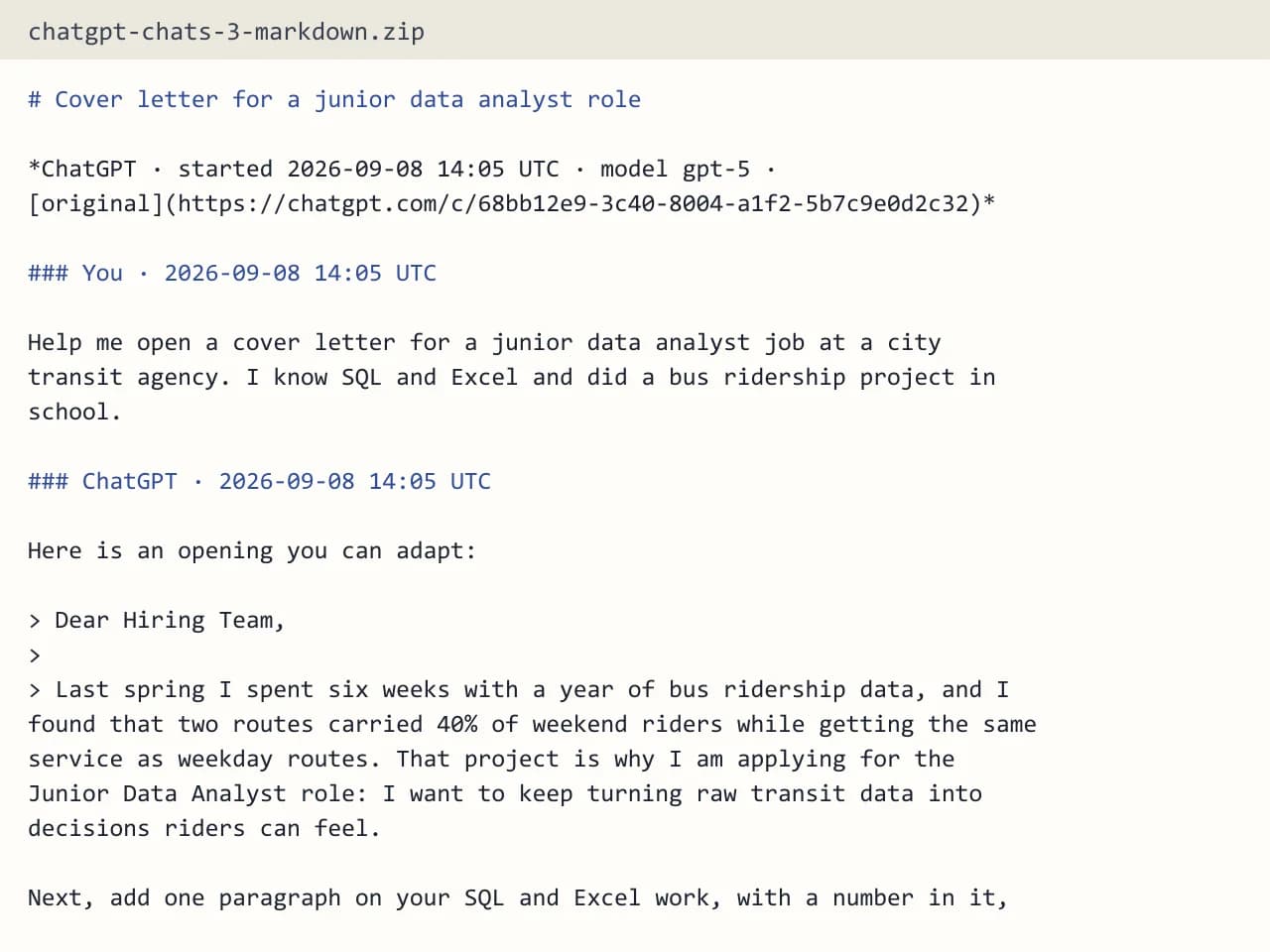
First, we ran our own sample export through this exact tool. The sample follows the real export layout, with chats we wrote ourselves. So the numbers below come straight from that run.
- Test input
- chatgpt-conversations.json
- Output
- chatgpt-chats-3-markdown.zip (Markdown (.md))
- Conversations
- 3
- Messages
- 8
- Output size
- 2 KB
- Processing time
- 0.0 s
How we test: the sample files hold ChatGPT and Claude chats with tables, code and lists, and we open every output by hand. More on the about page.
Why Markdown suits AI chats
ChatGPT answers are full of headings, bullet lists, tables and code. Markdown was made for exactly that kind of text. It marks a heading with a hash sign and a list with a dash, so the file stays readable even before any app renders it.
The files are also tiny and plain. You can open them in Notepad, put them under version control or search them with the file search on your computer. Because the syntax follows CommonMark, a shared spec, most editors and site builders display it the same way.
What the ChatGPT to Markdown files contain
Every chat gets its own file. The file carries the chat title, the model name when the export has it and a link back to the original chat. Each message keeps its time stamp in UTC, and the messages follow the order you see in the chat window.
For ChatGPT, that means the visible branch only. Older versions of edited prompts stay out. Citation markers such as 【4†source】 are removed, so the text reads as a clean conversation. In addition, Markdown keeps every character, emoji and Chinese, Japanese or Korean text included.
Images appear as "[Image]" and stay in your original zip. Hidden system messages, tool calls and model reasoning are not part of the files.
Where your .md files can go next
A folder of Markdown files fits many workflows. For example, a developer can commit useful coding chats to a project repo next to the code they shaped. A writer can drop research chats into a notes app that reads Markdown. A team can also paste one into a wiki page without fixing the formatting by hand.
Markdown is also a handy way to give an old chat to another AI tool as context, since the file is short, clean text with clear turn labels.
Markdown, plain text or an Obsidian vault?
Plain text drops the formatting marks, which is fine for a quick read but loses the look of tables and code. Markdown keeps them. An Obsidian vault goes one step further: it sorts the notes into folders by source and year, adds properties at the top of each note and builds an index note with links.
So pick Markdown when you want loose files for any app, and pick the vault when Obsidian is your home for notes.
When this exporter is not the right choice
If you need a print-ready page with fixed layout, a PDF or Word file serves you better. Also, this is a one-time export, not a live sync, so new chats will not show up in your folder later on their own.
Finally, Gemini, Grok, Copilot and DeepSeek exports are not supported, and ChatGPT share links do not work. For a shared chat, copy the text and paste it into the box instead.
Free exports and what we keep
A few free exports each day need no account. A free export holds the 10 newest of the chats you tick, while one credit covers everything you select. The server reads the chats in memory, writes the files and forgets them, and only a log row with format, count and time remains.
ChatGPT to Markdown output
| Item | What you get |
|---|---|
| File type | .md, one file per chat |
| Several chats | One .zip holding all the .md files |
| Kept | Code blocks, tables, lists, headings, every character |
| Per message | Time stamp in UTC, in chat window order |
| Removed | Citation markers and abandoned branches |
| Images | Shown as [Image], originals stay in the zip |
ChatGPT to Markdown FAQ
How do I convert a ChatGPT chat to Markdown?
Open your export zip on this page, tick the chat and pick Markdown (.md). For a single chat without the export, paste the copied text into the text box and choose Markdown.
Does ChatGPT have a Markdown export button?
No. The ChatGPT data export gives you a zip with conversations.json and chat.html. Our exporter turns that file into Markdown.
Do code blocks survive the ChatGPT to Markdown export?
Yes. Code blocks stay code blocks, and tables, lists and headings keep their Markdown syntax.
Why do I get a .zip instead of a .md file?
Each chat becomes its own file. When you pick more than one chat, the files come bundled in one .zip.
Can I convert a Claude export to Markdown too?
Yes. Drop the Claude export zip, or its conversations.json, and the tool reads it the same way.