Export Claude chat to PDF with bookmarks and page numbers
To export a Claude chat to PDF, request your data in Claude under Settings > Privacy, then drop the zip here and choose PDF. You get one file where each chat starts on a new page, with a bookmark per chat and page numbers, so long threads stay easy to print and browse.
By The Chatsheaf team (Product and testing). Last updated .
ZIP, JSON, TXT or MD. The zip is opened on your device; photos in it are never uploaded.
How to export a Claude chat to PDF, step by step
- In the Claude web app or Claude Desktop, open Settings > Privacy and select Export data.
- Download the zip from the email within 24 hours, while you are signed in.
- Drop the zip into the box above. Your browser lists every chat with its date and message count.
- Tick the chats you want in the PDF, or search the titles to find them.
- Pick PDF as the format and download the file.
The first 3 runs each day are free. After that, see the pricing page for packs and plans, or read how we test the tool.
Export Claude chat to PDF tested with a real input
First, we ran our own sample export through this exact tool. The sample follows the real export layout, with chats we wrote ourselves. So the numbers below come straight from that run.
- Test input
- claude-conversations.json
- Output
- claude-chats-2.pdf (PDF)
- Conversations
- 2
- Messages
- 6
- Output size
- 27 KB
- Processing time
- 0.1 s
How we test: the sample files hold ChatGPT and Claude chats with tables, code and lists, and we open every output by hand. More on the about page.
Why a PDF beats the raw Claude export
Claude gives you your data as a zip with conversations.json inside. That works for backups, but nobody wants to read it. A PDF, on the other hand, opens on any phone or computer, prints cleanly and looks the same for everyone you send it to.
It also suits records. For example, you might keep a chat that shaped a project decision, a contract draft you refined with Claude, or research notes for a client. A dated PDF is easy to file next to the rest of that work.
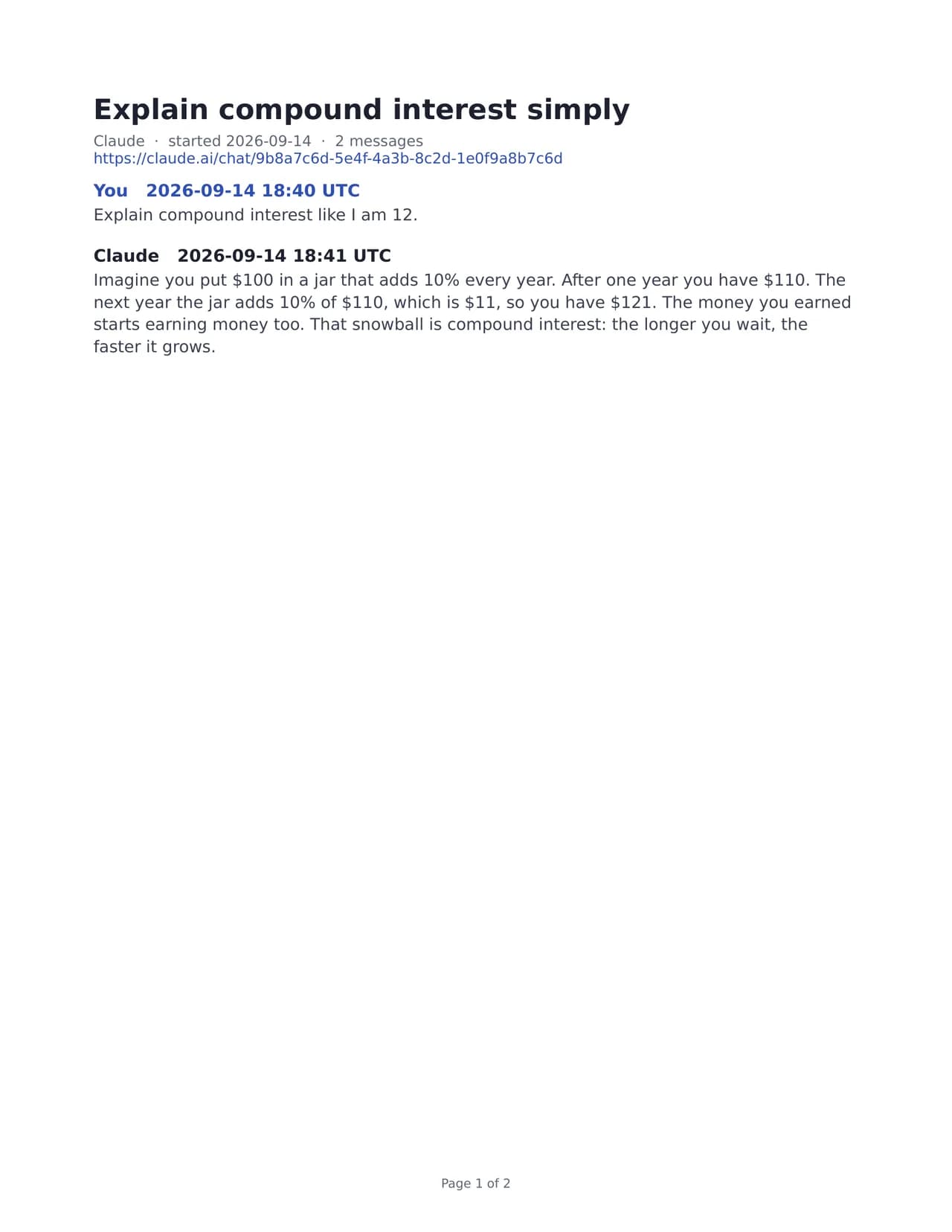
What the Claude chat PDF looks like
Every chat you pick lands in one PDF. Each one starts on a new page, so a short question never runs into a long coding session. The bookmark panel in your PDF reader lists each chat by title, and page numbers sit at the bottom of every page.
Inside a chat, your messages and Claude's replies keep the order you saw on screen. Each turn carries its UTC timestamp. Code blocks, tables, lists and headings keep their layout, which matters when the chat holds a script or a comparison table.
One PDF holds up to 300 conversations. If you select more, split them into several runs.
Export Claude chat to PDF: what to check first
The PDF font covers Latin, Greek and Cyrillic text. However, emoji and Chinese, Japanese or Korean characters do not make it into the PDF, and a note page tells you so. If your chats rely on them, choose Markdown, Word or HTML instead, because those formats keep every character.
Images show up as [Image], and files you attached appear by name only. Hidden system messages, tool calls and Claude's thinking stay out too. So the PDF reads like the visible chat, not like a full data dump.
Free and paid runs
You can try it without an account, since there are a few free exports each day. A free PDF holds the 10 newest of the chats you select and carries a one-line footer that says it was exported free. One paid credit covers a full export of everything you selected, with no footer. Prices live on the pricing page.
When this exporter is not the right choice
If you only need one short reply, copying it into a document may be quicker than a full account export. Also, if you work on the iPhone or Android app, you cannot request the export there, so you will need the web app or Claude Desktop. Finally, if you want to edit the text later, Word or Markdown will serve you better than a PDF.
Claude chat PDF details
| Feature | What you get |
|---|---|
| File count | One PDF for all selected chats |
| Page breaks | Each chat starts a new page |
| Navigation | One bookmark per chat, page numbers |
| Scripts in the font | Latin, Greek, Cyrillic |
| Left out of the PDF | Emoji and CJK characters (a note page says so) |
| Maximum per PDF | 300 conversations |
Export Claude chat to PDF FAQ
Can I export one Claude chat to PDF?
Yes. Claude exports your whole account as a zip, but you can tick a single chat in our list and get a PDF with just that one.
How do I save a Claude conversation as a PDF on my phone?
The iOS and Android apps cannot request the export. Request it from the web app or Claude Desktop, then open the zip here on a computer.
Why are emoji missing from my Claude PDF?
The PDF font covers Latin, Greek and Cyrillic, so emoji and CJK characters stay out, and a note page says so. Markdown, Word and HTML keep them.
Does the PDF include code blocks and tables?
It does. Code blocks, tables, lists and headings keep their shape, so a coding chat still reads like code.
How many Claude chats fit in one PDF?
Up to 300 conversations go into one PDF. For more, run the export again with the rest of your chats.
When I export a Claude chat to PDF, do you keep a copy?
No. The server builds the PDF in memory, sends it to you and forgets it. Only a log row with the format, the count and the time stays.