Best ChatGPT exporter: five ways to get your chats out
The best ChatGPT exporter depends on what you need to save. For one open chat with its images, an extension such as ChatGPT Exporter is quickest. For automatic sync into Obsidian, Carry fits. Chatsheaf fits when you want your whole history from the official export as Markdown, PDF, Word or a vault, with no extension.
By The Chatsheaf team (Product and testing). Last updated .
Best ChatGPT exporter: side by side
We read each public page on October 16, 2026. So where a page does not state a fact, the table says so.
| Chatsheaf | Official ChatGPT export | Copy and paste or Print to PDF | ChatGPT Exporter | Carry | |
|---|---|---|---|---|---|
| How it works | Upload the official export zip or its conversations.json, or paste one chat | Settings, Data controls, Export data; a download link arrives by email | Select the chat in the browser and copy it, or print the page to PDF | Chrome extension with an Export button on the open chat | Chrome extension that saves chats to a folder you pick |
| Browser extension | None | None | None | Yes; Chrome, plus Edge, Brave and other Chromium browsers | Yes; Chrome, Edge, Brave, Arc, Vivaldi and other Chromium browsers |
| Whole history at once | Yes, up to 5,000 chats per export | Yes, as one conversations.json and one long chat.html page | No, one chat at a time | Not stated; the steps cover the open chat | Yes with a license; the trial starts with your latest 25 chats |
| Other AI apps | Claude export zip too | ChatGPT only | Any page you can copy | Separate Claude, Gemini and Grok extensions, per their listing | Claude, Gemini and Grok |
| Output formats | Markdown, PDF, Word, HTML, plain text, Obsidian vault | JSON and HTML | Whatever you paste into, or a PDF | PDF, Markdown, Text, CSV, JSON and Image | Markdown, plus the original files |
Best ChatGPT exporter privacy, sync and price
| Chatsheaf | Official ChatGPT export | Copy and paste or Print to PDF | ChatGPT Exporter | Carry | |
|---|---|---|---|---|---|
| Images and files | Not copied; each image shows as [Image] | Your images sit in the zip as separate files | Depends on the browser and the page | Image is one of the export formats; full image handling not stated | Uploaded files and most files the AI makes, saved as originals |
| Automatic sync | No, a one-time export | No | No | Not stated | Yes, every few hours while Chrome is open |
| Where your chats go | Zip opens in your browser; only the picked chats reach our server, which builds the file in memory and keeps nothing | Stays with OpenAI until you download it | Stays in your own browser | PDF runs on their server and gets deleted; other formats stay in the browser, per their listing | Saved to your folder; Carry never uploads chats, per their page |
| Wait time | Needs the official zip first | Up to 7 days; the link expires 24 hours after it arrives | None | None stated; you click Export | Not stated; it saves in the background |
| Price | Free: a few exports a day with the 10 newest chats. Pack $4.99 for 5 full exports; Backup $4.99 a month or $29 a year; Pro $12.99 a month | Free | Free | Markdown, Text, JSON and CSV free; 3 free PDFs a day; Starter $1.99 and Standard $2.99 a month, billed yearly | $79 once, or $59 with the code EARLY20; 14-day free trial with no card |
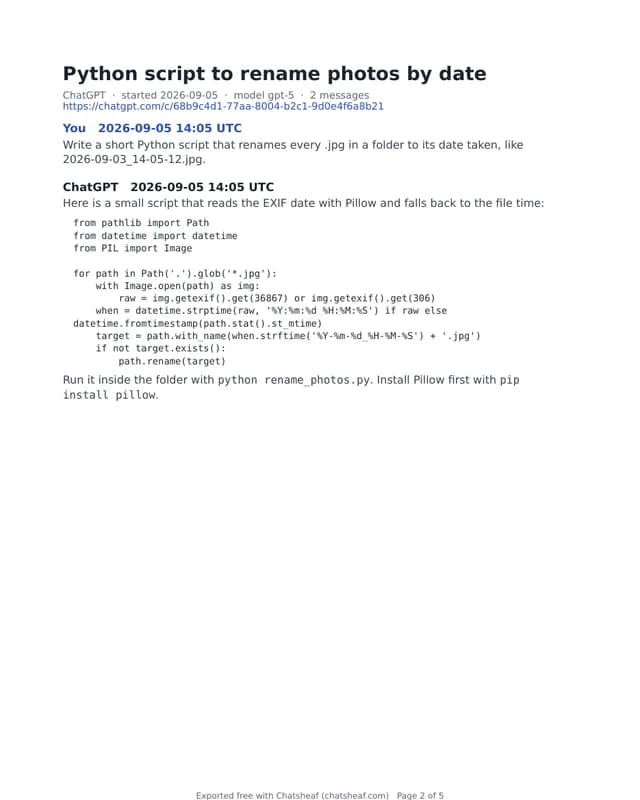
How we compared each ChatGPT exporter
First, a word on method. We read the public page of each tool on October 16, 2026, and we wrote down only what that page states. So every cell about another tool comes from a page you can open yourself, and the links sit at the bottom.
However, we did not run a test chat through the two extensions. Therefore this guide compares stated facts, such as formats, sync and price, and it does not rank output quality. Also, we make Chatsheaf, so read our own column with that in mind.
The official export: complete, but slow and raw
OpenAI gives every Free, Go, Plus and Pro user a built-in export. You open Settings, then Data controls, and choose Export data. Next, an email with a download link arrives, sometimes after a few minutes and sometimes after days. OpenAI says it can take up to 7 days, and the link expires 24 hours after you get it.
The zip holds everything, which is its strength. Still, the chats come as one large conversations.json file and one long chat.html page. Neither reads well as notes, and neither imports into Word or Obsidian. In addition, Business and Enterprise workspaces cannot use this export at all.
Copy and paste or Print to PDF: free, one chat at a time
For a single short chat, the simplest route still works. You select the conversation, copy it and paste it into a document. Or you press Print in the browser and save the page as a PDF.
Both routes cost nothing and need no account. On the other hand, they take one chat at a time, and long code blocks or wide tables can break across pages in a printed PDF. So they suit a quick save, not an archive.
ChatGPT Exporter: the quick pick for the open chat
ChatGPT Exporter is a Chrome extension. After you install it, an Export button appears on chatgpt.com, and you save the open chat as PDF, Markdown, Text, CSV, JSON or an image. You can even tick single messages. Its listing shows 4.9 out of 5 from about 2.7K ratings.
This is where extensions win. They export straight from the chat you are reading, so you skip the 7 day wait. They also see what the page shows, including images. Markdown, Text, JSON and CSV are free, and PDF has 3 free exports a day. However, its page does not describe a way to export your whole history in one go.
Carry: automatic sync into an Obsidian folder
Carry takes a different job. Its Chrome extension reads ChatGPT, Claude, Gemini and Grok through your own session, and it writes one Markdown file per chat into a folder you pick. Then it checks for new chats every few hours while Chrome is open, so the backup keeps itself current.
Carry also saves files you upload and most files the AI creates, which no export file gives you in readable form. It costs $79 once, or $59 with the launch code EARLY20, after a 14-day free trial. As a result, it is the better pick if you want a living vault that updates without your help.
Chatsheaf: the whole history, no extension
Chatsheaf works on the official export file instead of your open browser tab. You upload the zip, and your browser opens it and lists every chat with its title, date and message count. Next, you tick the chats you want and pick Markdown, PDF, Word, HTML, plain text or an Obsidian vault. Claude export zips work the same way.
Because no extension runs in your account, nothing reads your chats while you work. Only the chats you picked reach our server, which builds the file in memory and keeps nothing. A few free exports a day hold the 10 newest selected chats. After that, a pack of 5 full exports costs $4.99, and Backup costs $4.99 a month or $29 a year.
When the best ChatGPT exporter is not us
Our exporter is a one-time export, not a sync. So if you want new chats saved on their own, Carry does that and we do not. Likewise, we do not copy images or uploaded files into the output, and we cannot read ChatGPT share links.
Also, you must wait for the official export email before you can start. If you need one chat right now, with its pictures, an extension or a plain copy is faster. Choose us when you want the full history, Claude as well, a Word file or a ready Obsidian vault, and no extension with access to your account.
Best ChatGPT exporter FAQ
What is the best ChatGPT exporter?
There is no single winner. ChatGPT Exporter is quickest for one open chat, Carry syncs chats into a folder automatically, and Chatsheaf turns your full official export into Markdown, PDF, Word or an Obsidian vault.
Is there a free ChatGPT exporter?
Yes. The official export, copy and paste, and the Markdown exports of ChatGPT Exporter cost nothing. Chatsheaf gives a few free exports a day with the 10 newest selected chats.
Can I export all my ChatGPT chats at once?
Yes, through the official export in Settings, Data controls. It sends one zip with every chat. Chatsheaf then reads that zip and turns up to 5,000 chats into readable files.
Which ChatGPT exporter keeps images?
Extensions see the open page, so ChatGPT Exporter offers an image format and Carry saves files as originals. Chatsheaf marks each image as [Image] and leaves the pictures in your original zip.
Do I need a browser extension to export ChatGPT?
No. The official export needs only your account, and Chatsheaf runs on that file in a normal browser tab. Extensions are optional and trade convenience for access to the chat pages.
Which best ChatGPT exporter works with Obsidian?
Carry writes Markdown into a folder or vault and keeps it synced. Chatsheaf builds a one-time Obsidian vault with frontmatter, folders by year and an index note.
Can I export ChatGPT to Word?
Yes. Chatsheaf saves the chats you pick as one .docx file with headings per message. The other tools here do not list Word as an output.